Analysis of all your invoices: paid, pending, and overdue.
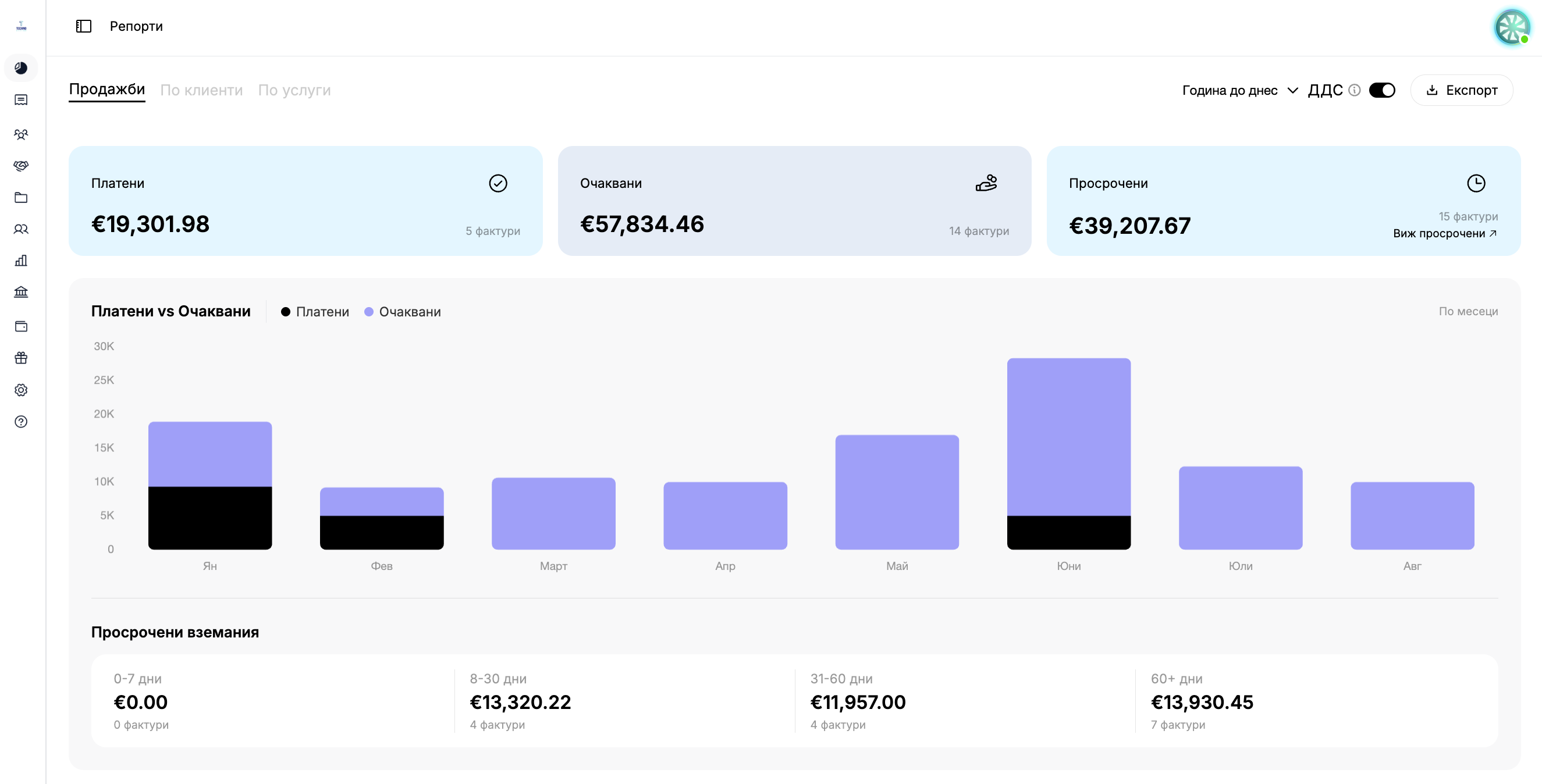
Financial reports on the status of your invoices all in one place—which have been paid, which are pending, and which overdue receivables you need to collect.
Everything you need to know about your payments at at a glance. Filtered by period, ready for export.
Overview: Paid, Pending, Overdue—Financial reports for paid, pending, and overdue invoices, updated at immediately upon changing the period.
Overdue Receivables by Age: Receivables management, broken down by age—from 0–7 to 60+ days. Part of for your business’s financial management. Available in the Team or Enterprise plan.
Filter by Period: Selecta period—day, month, quarter, or year—to generate an up-to-date accounting report at at any time.
Export Report as PDF: Downloada PDF report containing the charts, graphs, and tables for the selected period— —a ready-to-use document for your financial management. Available on the Team or Enterprise plans.
Interactive Payment Chart: Comparepaid and expected amounts with the exact amount when specified—clear business statistics all in one place.
A Single Currency for All Reports: Allamounts are displayed in EUR, even for invoices in BGN—ensuring consistent financial reports without the need for manual conversion.
One dashboard. One PDF. Everything you need to know about your payments.
Overview of Real-Time Payments
View financial reports on paid, pending, and overdue invoices— provides the exact amount and number for each category, plus a monthly comparison chart. Clear business statistics all in one place.
Download a PDF report containing the charts, graphs, and tables for the selected period— —a ready-to-use document for financial management, sharing, or archiving. Available in the Team or Enterprise plan.
What sections are included in the "Analytics" feature?
It is divided into three tabs—Sales, By Customer, and By Service—with a general filter for the period. Each tab displays various financial reports and business statistics for your business.
How does the period filter work?
This applies to all tabs, whether you use predefined time periods or a manually selected range—your financial management data is updated immediately when you make a change.
What does the PDF export contain?
The "Export" button generates a PDF containing a financial report for the selected period— , the chart showing the exact amounts, and the table. The document is ready to be sent to or saved as an archive.
What can I see if I'm on the Free or Solo plan?
The charts, the report on overdue receivables, the tables, and the PDF export at appear grayed out, with an upgrade button. The KPI dashboards are visible, but with sample numbers at for visual context only.
Why are all the amounts in EUR, even though my invoices are in leva?
To ensure consistency in financial reporting across financial statements, all amounts are reported in EUR, regardless of the currency of the invoice.
How can I view receivables that are past due due to the statute of limitations?
In the "Sales" and "By Customer" tabs, the "View Overdue" button takes you directly to , where you can manage receivables filtered by overdue items only.